MIDI Interface Manual
MIDI Interface Manual

Welcome to the construction manual for the MIDI IN + 4× MIDI THRU Interface, a compact little box whose entire purpose in life is to take one stream of MIDI data and multiply it like a well‑behaved, electrically isolated rabbit. This device is designed for builders who appreciate clean signal paths, modular wiring, and the deep personal satisfaction of knowing exactly where every resistor on the board lives — and why it’s there.
This project combines several classic ingredients of electronic music hardware:
- A 6N138 optocoupler, whose job is to stare suspiciously at incoming MIDI data and only pass along the important bits.
- A 74HC14 Schmitt inverter, which takes the optocoupler’s nervous whisper and turns it into a crisp, confident digital signal.
- A 78L05 voltage regulator, which bravely converts your wildly unpredictable 9–15 V DC input into a calm, dependable 5 V supply.
- And finally, a MatrixPortal tap point, because what’s the point of building a MIDI interface if you can’t also make it drive a lyric display, a robot drummer, or whatever other contraption you’ve decided to unleash upon the world.
All MIDI jacks, switches, and LEDs are panel‑mounted, because you deserve a device that doesn’t rip its connectors off the board the first time someone bumps a cable. Everything connects to the main board through pin headers, giving you modularity, serviceability, and the ability to unplug things dramatically when troubleshooting.
The circuit is built on a 2" × 3" perfboard, which is just large enough to be comfortable and just small enough to make you feel clever. The layout is intentionally simple, the wiring is intentionally logical, and the end result is intentionally robust — a reliable MIDI splitter that won’t add latency, won’t distort your signal, and won’t judge you for still owning that one synth with the sticky keys.
Whether you’re integrating this into a larger system, mounting it inside a custom enclosure, or simply building it because you enjoy the smell of flux in the morning, this manual will guide you through every step with clarity, precision, and the occasional moment of levity. After all, if you can’t have fun while soldering tiny metal legs onto a tiny green board, what are we even doing here.
Let’s begin.
始めましょう
Parts
Parts
This chapter provides a complete list of components required for the MIDI Interface build.
The parts are organized into three categories:
- Voltage Regulation — components for generating and stabilizing the 5 V supply
- Logic and Signal Components — the optocoupler, Schmitt trigger, transistor, and supporting resistors
- Connectors and Indicators — MIDI jacks, LED, switch, and wiring harnesses
Use the subchapters below to view the detailed lists for each category.
Parts List (Grouped by Component Type)
🧩 Integrated Circuits
- 6N138 optocoupler
- Quantity: 1
- 74HC14 hex Schmitt‑trigger inverter
- Quantity: 1
- 78L05 voltage regulator (TO‑92 package)
- Quantity: 1
- Function: 5 V linear regulator, ~100 mA output
- Pinout (flat face toward you, leads downward):
- Pin 1: VIN
- Pin 2: GND
- Pin 3: VOUT (+5 V)
🔩 Transistors
- NPN transistor (2N3904, 2N2222, or equivalent)
- Quantity: 1
🛠️ Resistors
- 220 Ω resistors
- Quantity: 4
- Use: MIDI THRU current limiting
- 470 Ω resistor
- Quantity: 1
- Use: 6N138 VO → NPN base
- 10 kΩ resistor
- Quantity: 1
- Use: NPN collector pull‑up
- 1 kΩ resistor
- Quantity: 1
- Use: LED series resistor
🔋 Capacitors
Decoupling
- 0.33 µF capacitor (VIN → GND)
- Quantity: 1
- Type: Ceramic or electrolytic
- 0.1 µF capacitor (VOUT → GND)
- Quantity: 1
- Type: Ceramic
Bulk (Recommended)
- 10 µF electrolytic (input smoothing, VIN → GND)
- Quantity: 1
- Voltage rating: 16 V or higher
- 10 µF electrolytic (output smoothing, +5 V → GND)
- Quantity: 1
- Voltage rating: 10 V or higher
🔌 Connectors
- DC input connector (2‑pin or barrel jack)
- Quantity: 1
- MIDI IN connector (5‑pin DIN or harness)
- Quantity: 1
- MIDI THRU connectors
- Quantity: 4
💡 Indicators
- Standard LED (3 mm or 5 mm)
- Quantity: 1
🔧 Switches
- SPST power switch
- Quantity: 1
- Function: DC+ → VIN
🪛 Wiring and Headers
- Panel wiring for:
- MIDI IN
- 4× MIDI THRU
- LED
- Power switch
- DC input
- Optional: pin headers for removable harnesses
Bill of materials
| Category | Role | Component | Qty | Notes |
|---|---|---|---|---|
| Integrated Circuits | Logic and signal | 6N138 Optocoupler | 1 | MIDI IN isolation |
| Integrated Circuits | Logic and signal | 74HC14 Hex Schmitt Trigger | 1 | Signal conditioning (6 inverters) |
| Integrated Circuits | Power | 78L05 Voltage Regulator (TO‑92) | 1 | 5 V regulator, ~100 mA output,
|
| Transistors | Logic and signal | NPN Transistor (2N3904, 2N2222, MPS6514 or similar) | 1 | General‑purpose NPN transistor used for buffering and driving the LED indicator, MIDI out/thru driver |
| Resistors | Logic and signal | 220 Ω | 4 | MIDI THRU current limiting |
| Resistors | Logic and signal | 470 Ω | 1 | 6N138 VO → NPN base |
| Resistors | Logic and signal | 10 kΩ | 1 | NPN collector pull‑up |
| Resistors | Logic and signal | 1 kΩ | 1 | LED series resistor |
| Capacitors | Power | 0.33 µF (ceramic or electrolytic) | 1 | Regulator input decoupling |
| Capacitors | Power | 0.1 µF (ceramic) | 1 | Regulator output decoupling |
| Capacitors | Power | 10 µF electrolytic (16 V+) | 2 | Input and output smoothing |
| Connectors | Power | DC Input Connector (2‑pin or barrel jack) | 1 | Power input |
| Connectors | Logic and signal | MIDI Connector (5‑pin DIN or harness) | 5 | Input port, parallel thru outputs |
| Indicators | Power | LED (3 mm or 5 mm) | 1 | Power or activity indicator |
| Switches | Power | SPST Power Switch | 1 | DC+ → VIN |
| Wiring & Headers | Wiring | Panel Wiring | As needed | MIDI IN, 4× THRU, LED, switch, DC input |
| Wiring & Headers | Wiring | Optional Pin Headers | As needed | For removable harnesses |
Component pin-outs
Component pin-outs
6N138 Optocoupler
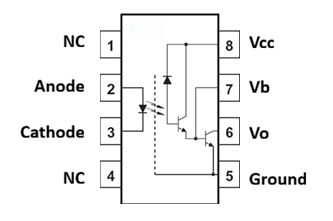
- Pin 1 -- NC
- Pin 2 -- LED Anode (input +)
- Pin 3 -- LED Cathode (input -)
- Pin 4 -- NC
- Pin 5 -- GND
- Pin 6 -- V (output)
- Pin 7 -- V (base)
- Pin 8 -- VCC (+5V)
74HC14 Schmitt‑Trigger Inverter (DIP‑14, notch up)
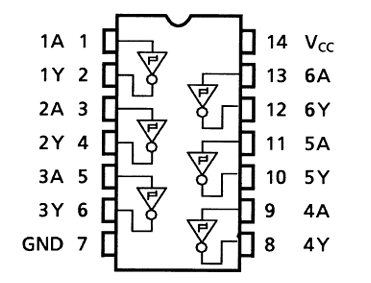
- Pin 1 – Inverter 1 Input
- Pin 2 – Inverter 1 Output
- Pin 3 – Inverter 2 Input
- Pin 4 – Inverter 2 Output
- Pin 5 – Inverter 3 Input
- Pin 6 – Inverter 3 Output
- Pin 7 – GND
- Pin 8 – Inverter 4 Input
- Pin 9 – Inverter 4 Output
- Pin 10 – Inverter 5 Input
- Pin 11 – Inverter 5 Output
- Pin 12 – Inverter 6 Input
- Pin 13 – Inverter 6 Output
- Pin 14 – VCC (+5 V)
MIDI 5-pin DIN
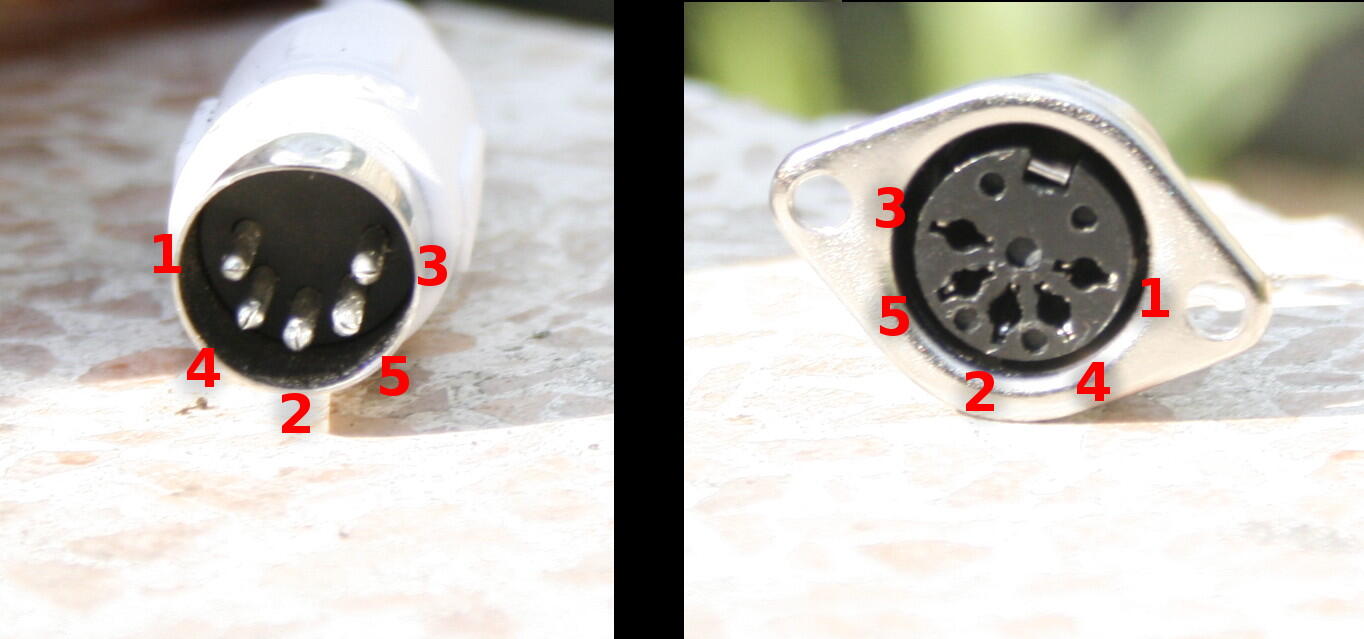
- Pin 4 – Signal source
- Pin 5 – Signal return
- Pin 2 – Ground
Sub circuits
Sub circuits
These are the circuits for the functional sub-sections of the interface.
Power regulation circuit
Power regulation circuit
Provides a stable 5 V supply from a 9–15 V DC input source.
Regulator Pinout (front view)
- Pin 1: VIN
- Pin 2: GND
- Pin 3: VOUT (5 V)
Input Side Components
- DC jack → Power switch → 7805 Pin 1
- 0.33 µF ceramic capacitor from Pin 1 to Pin 2
- 10 µF electrolytic capacitor from Pin 1 to Pin 2
Output Side Components
- 7805 Pin 3 → +5 V rail
- 0.1 µF ceramic capacitor from Pin 3 to Pin 2
- 10 µF electrolytic capacitor from Pin 3 to Pin 2
Thermal Notes
At 15 V input, the regulator may dissipate up to 0.4 W depending on load. Mount the 7805 with airflow clearance or attach a small heatsink if desired.
MIDI in circuit
MIDI in circuit
Converts the MIDI current loop into a logic‑level signal while maintaining galvanic isolation.
DIN input wiring
- DIN Pin 4 → 220 Ω resistor → 6N138 Pin 2
- DIN Pin 5 → 6N138 Pin 3
- DIN Pin 2 → Ground
This forms the standard MIDI current loop into the optocoupler.
Optocoupler power and bias
- 6N138 Pin 5 → Ground
- 6N138 Pin 8 → +5 V
- 6N138 Pin 7 (VB) → Leave unconnected for MIDI applications
- (VB is used for CTR tuning in other applications, but not needed here)
Optocoupler output stage
- 6N138 Pin 6 (VO) → 10 kΩ pull‑up resistor → +5 V
- 6N138 Pin 6 (VO) → 470 Ω resistor → MPS6514 NPN Base
- MPS6514 NPN Emitter → Ground
- MPS6514 NPN Collector → +5 V through 10 kΩ pull‑up
This transistor stage strengthens the optocoupler output and ensures clean edges.
Logic output to 74HC14
- MPS6514 NPN Collector → 74HC14 Pin 1
- 74HC14 Pin 2 = cleaned, conditioned MIDI logic signal.
IN Activity LED
- MPS6514 NPN Collector → 1 kΩ resistor → LED anode
- LED cathode → Ground
The LED flashes on incoming MIDI activity.
MIDI THRU distribution circuit
MIDI THRU distribution circuit
Generates four identical, low‑latency copies of the cleaned MIDI signal.
Signal Conditioning
- 74HC14 Pin 1 → Pin 2 (first inverter)
- Pin 2 fans out to:
- Pin 3
- Pin 5
- Pin 8
- Pin 10
Output Pins
- THRU 1: Pin 4
- THRU 2: Pin 6
- THRU 3: Pin 9
- THRU 4: Pin 11
Each output passes through a 220 Ω resistor before reaching the panel‑mounted THRU jack.
Assembly instructions
Assembly instructions
Overview
- 12 V → 5 V regulator
- 6N138 MIDI IN
- 74HC14 fan‑out
- 5 V power‑on LED
- THRU/OUT activity LED
- Pin‑header MIDI jacks
- Full wire‑color guidance
- No grid coordinates
This version is ideal for perfboard assembly where you place parts by eye and follow the wiring map.
🎛️ Wire Color Key
- Red → +12 V input
- Orange → +5 V regulated
- Black → Ground
- Yellow → MIDI signal lines (raw + clean)
- Blue → Logic connections (inverter inputs/outputs)
- Green → LED wiring
- White → Misc short links / regulator wiring
🧱 FULL ASSEMBLY INSTRUCTIONS
1. Build the 12 V → 5 V Regulator Block
78L05 orientation
Flat face toward you:
Pin 1 = IN, Pin 2 = GND, Pin 3 = OUT
Wiring
- Red wire: 12 V input → 1N4007 diode → 78L05 pin 1
- Stripe on diode faces the regulator
- Black wire: 12 V ground → perfboard ground bus
- Orange wire: 78L05 pin 3 → +5 V bus
- Black wire: 78L05 pin 2 → ground bus
Capacitors
- 100 µF electrolytic: + to pin 1, – to ground
- 10 µF electrolytic: + to pin 3, – to ground
- 100 nF ceramic: between pin 3 and ground
2. Add the 5 V Power‑On LED
- Green wire: +5 V bus → 1 kΩ resistor → LED anode
- LED cathode → Black wire → ground bus
This LED lights whenever the regulator is producing 5 V.
3. Place and Power the 6N138 Optocoupler
Power
- Orange wire: pin 8 → +5 V
- Black wire: pin 5 → ground
Pull‑up
- 10 kΩ resistor: pin 6 → +5 V
MIDI IN protection diode 1N4007
- Between pin 2 and pin 3
- Stripe toward pin 2
4. Install the MIDI IN Header (3‑pin)
Header pin mapping:
- Pin 1 = DIN pin 4
- Pin 2 = DIN pin 5
- Pin 3 = DIN pin 2 (GND)
Wiring
- Yellow wire: header pin 1 → 220 Ω resistor → 6N138 pin 2
- Yellow wire: header pin 2 → 6N138 pin 3
- Black wire: header pin 3 → ground bus
5. Connect 6N138 Output to 74HC14 Input + MatrixPortal RX
6N138 output
- Pin 6 = raw MIDI logic output
Wiring
- Yellow wire: 6N138 pin 6 → 74HC14 pin 1 (first inverter input)
- Blue wire: 74HC14 pin 2 (first inverter output) → MatrixPortal RX
Important
74HC14 pin 2 is the “clean MIDI” signal.
All THRU inputs will come from this pin.
6. Place and Power the 74HC14
Power
- Orange wire: pin 14 → +5 V
- Black wire: pin 7 → ground
7. Fan Out the Clean MIDI Signal to All THRU Inputs
All THRU inverters must receive the same input from pin 2.
Wiring (all blue)
- Pin 2 → pin 3
- Pin 2 → pin 5
- Pin 2 → pin 9
- Pin 2 → pin 11
This feeds the clean MIDI signal to all four THRU channels.
8. Add the THRU/OUT Activity LED
This LED shows the buffered MIDI signal.
Wiring
- Green wire: 74HC14 pin 2 → 1 kΩ resistor → LED anode
- LED cathode → Black wire → ground
9. Install the Four THRU Headers (3‑pin each)
Each header uses the same mapping:
- Pin 1 = DIN pin 4 (from +5 V via 220 Ω)
- Pin 2 = DIN pin 5 (from inverter output via 220 Ω)
- Pin 3 = DIN pin 2 (GND)
10. Wire the THRU Outputs
THRU1 (inverter B)
- Blue wire: pin 4 → 220 Ω → header pin 2
- Orange wire: +5 V → 220 Ω → header pin 1
- Black wire: header pin 3 → ground
THRU2 (inverter C)
- Blue wire: pin 6 → 220 Ω → header pin 2
- Orange wire: +5 V → 220 Ω → header pin 1
- Black wire: header pin 3 → ground
THRU3 (inverter D)
- Blue wire: pin 8 → 220 Ω → header pin 2
- Orange wire: +5 V → 220 Ω → header pin 1
- Black wire: header pin 3 → ground
THRU4 (inverter E)
- Blue wire: pin 10 → 220 Ω → header pin 2
- Orange wire: +5 V → 220 Ω → header pin 1
- Black wire: header pin 3 → ground
11. Internal MIDI OUT (No DIN Jack)
Use the last inverter (F):
Wiring
- Yellow wire: MatrixPortal TX → 74HC14 pin 13
- Blue wire: 74HC14 pin 12 → internal OUT pad/header
This gives you a clean, buffered logic‑level MIDI OUT.
Breadboard layout
Breadboard layout
🎛️ Wire Color Key
- Red → +12 V input
- Orange → +5 V regulated
- Black → Ground
- Yellow → MIDI signal lines (raw + clean)
- Blue → Logic connections (inverter inputs/outputs)
- Green → LED wiring
- White → Misc short links / regulator wiring
🧱 FULL STEP‑BY‑STEP ASSEMBLY
1. Build the 12 V → 5 V Regulator Block
Place the 78L05
Flat face toward you:
(1) IN — (2) GND — (3) OUT
Wire the input
- Red wire: 12 V → 1N4007 → 78L05 pin 1
- Black wire: 12 V ground → GND rail
Add capacitors
- 100 µF: 78L05 pin 1 → GND
- 10 µF: 78L05 pin 3 → GND
- 100 nF: 78L05 pin 3 → GND
Create rails
- Orange wire: 78L05 pin 3 → +5 V rail
- Black wire: 78L05 pin 2 → GND rail
2. Add the 5 V Power‑On LED
Place this near the regulator block.
- Green wire: +5 V rail → 1 kΩ resistor → LED anode
- LED cathode → Black wire → GND
This LED lights whenever the regulator is producing 5 V.
3. Place the ICs
- 6N138 left‑center, straddling the trench
- 74HC14 right‑center, straddling the trench
4. Power the ICs
- Orange wire: 6N138 pin 8 → +5 V
- Black wire: 6N138 pin 5 → GND
- Orange wire: 74HC14 pin 14 → +5 V
- Black wire: 74HC14 pin 7 → GND
Pull‑up
- 10 kΩ: 6N138 pin 6 → +5 V (orange)
5. Place and Wire the MIDI IN Header
Header pin mapping:
- Pin 1 = DIN pin 4
- Pin 2 = DIN pin 5
- Pin 3 = DIN pin 2 (GND)
Wire it
- Yellow wire: IN pin 1 → 220 Ω → 6N138 pin 2
- Yellow wire: IN pin 2 → 6N138 pin 3
- Black wire: IN pin 3 → GND
Protection diode
- Between 6N138 pins 2 and 3
- Stripe toward pin 2
6. Connect 6N138 Output to 74HC14 and MatrixPortal RX
- Yellow wire: 6N138 pin 6 → 74HC14 pin 1
- Blue wire: 74HC14 pin 2 → MatrixPortal RX
⭐ Important clarification:
74HC14 pin 2 is the “clean MIDI” signal.
All THRU inverter inputs will connect to this exact pin.
7. Connect ALL THRU Inverter Inputs to 74HC14 Pin 2
Use blue wires to tie each inverter input to the clean MIDI node at pin 2:
- 74HC14 pin 3 → pin 2
- 74HC14 pin 5 → pin 2
- 74HC14 pin 9 → pin 2
- 74HC14 pin 11 → pin 2
This means:
Pin 2 is the single source feeding all four THRU inverters.
8. Add THRU/OUT Activity LED
This LED shows the buffered MIDI signal feeding all THRUs and your internal OUT.
- Green wire: 74HC14 pin 2 → 1 kΩ → LED anode
- LED cathode → Black wire → GND
9. Place THRU Headers (THRU1–4)
Each header:
- Pin 1 = DIN pin 4 (from +5 V via 220 Ω)
- Pin 2 = DIN pin 5 (from inverter output via 220 Ω)
- Pin 3 = DIN pin 2 (GND)
Place them along the bottom right of the breadboard.
10. Wire THRU Outputs
THRU1 (inverter B)
- Blue wire: 74HC14 pin 4 → 220 Ω → THRU1 pin 2
- Orange wire: +5 V → 220 Ω → THRU1 pin 1
- Black wire: THRU1 pin 3 → GND
THRU2 (inverter C)
- Blue wire: 74HC14 pin 6 → 220 Ω → THRU2 pin 2
- Orange wire: +5 V → 220 Ω → THRU2 pin 1
- Black wire: THRU2 pin 3 → GND
THRU3 (inverter D)
- Blue wire: 74HC14 pin 8 → 220 Ω → THRU3 pin 2
- Orange wire: +5 V → 220 Ω → THRU3 pin 1
- Black wire: THRU3 pin 3 → GND
THRU4 (inverter E)
- Blue wire: 74HC14 pin 10 → 220 Ω → THRU4 pin 2
- Orange wire: +5 V → 220 Ω → THRU4 pin 1
- Black wire: THRU4 pin 3 → GND
11. Internal MIDI OUT (No DIN Jack)
Use the last inverter (F):
- Yellow wire: MatrixPortal TX → 74HC14 pin 13
- Blue wire: 74HC14 pin 12 → internal OUT node (your choice)
This gives you a clean, buffered logic‑level MIDI OUT.
Perfboard layout
Perfboard layout
This chapter provides the complete physical layout for assembling the MIDI Interface on a 2" × 3.5" solderable half‑breadboard perfboard (ElectroCookie style).
It includes:
- Exact placement of the 6N138, 74HC14, 78L05, NPN transistor, resistors, and capacitors
- Placement of all panel headers (MIDI IN, 4× THRU, LED, switch, DC input)
- Power‑rail usage and recommended routing strategy
- A literal, row‑and‑column‑based layout for reproducibility
Perfboard overview
You are using a 2" × 3.5" solderable half‑breadboard perfboard with:
- A center gap between rows E and F for DIP ICs
- Power rails along the left and right edges
- Rows labeled A–J (top to bottom)
- Columns numbered 1–30 (left to right)
For consistency, this manual uses:
- Row A = top edge
- Row J = bottom edge
- Column 1 = left edge
- Column 30 = right edge
ICs straddle the E/F gap.
Note -- I filed the traces off of the bottom power rails so that each of those holes is individual and can be used for the headers.
IC orientation
6N138 placement
Place the 6n138 so that:
- Pins 1-4 sit on E8–E11
- Pins 5-8 sit on F11–F8
74HC14 Placement
Place the 74HC14 so that:
- Pins 1–7 sit on E12–E18
- Pins 8–14 sit on F18–F12
This keeps it to the right of the 6N138 with clean routing to the THRU resistors.
78L05 Regulator
Place 78L04 so that:
- H26 = VIN
- H27 = GND
- H28 = +5 V
Component placement map
Below is the literal placement map for all components.
ICs
- 6N138: E8–E11 / F8–F11
- 74HC14: E12–E18 / F12–F18
Transistor
- NPN (2N3904/2N2222):
- Collector → near F10/F11 region
- Base → near F9 (470 Ω resistor connects here)
- Emitter → ground rail
Recommended location: Rows G–H, Columns 9–11
Resistors
MIDI IN / Optocoupler
- 470 Ω: between 6N138 pin 6 (F10) and NPN base
- 10 kΩ: between NPN collector and +5 V rail
- 1 kΩ: LED series resistor near LED header
MIDI THRU
Place the four 220 Ω resistors in a vertical bank below the 74HC14:
- R1: G13
- R2: G14
- R3: G15
- R4: G16
Each connects from a 74HC14 output to its corresponding THRU header.
Capacitors
Regulator input side
- 0.33 µF: between H26 (VIN) and H27 (GND)
- 10 µF (16 V+): same nodes, placed nearby
Regulator output side
- 0.1 µF: between H28 (+5 V) and H27 (GND)
- 10 µF (10 V+): same nodes, placed nearby
Panel header placement
All panel headers are placed along the bottom edge (Row J) for clean wiring to the enclosure.
Left to Right:
- MIDI IN Header (3‑pin)
- J5–J7
- MIDI THRU Headers (4× 3‑pin)
- THRU1: J10–J12
- THRU2: J14–J16
- THRU3: J18–J20
- THRU4: J22–J24
- LED Header (2‑pin)
- J26–J27
- Power Switch Header (2‑pin)
- J28–J29
- DC Input Header (2‑pin)
- J30–J31 (or nearest available)
Power rails
Use the built‑in rails:
- Left rail: Ground
- Right rail: +5 V
Connect:
- 78L05 output (H28) → +5 V rail
- 78L05 ground (H27) → ground rail
- 6N138 pin 8 (F8) → +5 V rail
- 6N138 pin 5 (F11) → ground rail
- 74HC14 pin 14 → +5 V rail
- 74HC14 pin 7 → ground rail
Recommended routing strategy
MIDI IN section
- Keep the LED‑side wiring short
- Route the 470 Ω resistor directly to the NPN base
- Keep the 10 kΩ pull‑up close to the NPN collector
THRU section
- Route each 74HC14 output straight down to its 220 Ω resistor
- Then straight to the THRU header pins
- Maintain clean, parallel lines for serviceability
Power section
- Keep regulator capacitors tight to the 78L05
- Use short, direct traces to the rails
- Avoid crossing the logic section with VIN wiring
Final checkpoints
Before soldering the wiring:
- Confirm 6N138 pin 8 is on F8 and goes to +5 V
- Confirm 6N138 pin 5 is on F11 and goes to ground
- Confirm 74HC14 pin 14 is powered and pin 7 is grounded
- Confirm all THRU resistors are 220 Ω
- Confirm the NPN emitter is grounded
- Confirm the LED resistor is 1 kΩ
- Confirm the regulator capacitors are oriented correctly
Panel wiring via pin headers
Panel wiring via pin headers
MIDI IN Header (3‑pin)
- Pin 1 → DIN Pin 4
- Pin 2 → DIN Pin 5
- Pin 3 → Ground (DIN Pin 2)
THRU Headers (4 × 3‑pin)
Each THRU jack uses:
- Pin 1 → +5 V (through 220 Ω) → DIN Pin 4
- Pin 2 → 74HC14 output (through 220 Ω) → DIN Pin 5
- Pin 3 → Ground → DIN Pin 2
Power Switch Header (2‑pin)
- Pin 1 → DC jack +V
- Pin 2 → 7805 VIN
IN LED Header (2‑pin)
- Pin 1 → LED anode (via 1 kΩ)
- Pin 2 → Ground
MatrixPortal Header (3‑pin)
- GND
- RX (from MPS6514 NPN collector)
- +5 V
Testing and verification
Testing and verification
Power Test
- Apply 9–15 V DC
- Verify 5 V output from the regulator
- Check for excessive heat
MIDI IN Test
- Connect a MIDI source
- Confirm IN LED activity
THRU Output Test
- Connect downstream devices
- Verify all receive identical MIDI data
MatrixPortal Test
- Connect RX and GND
- Run firmware
- Confirm MIDI events are received
Usage notes and expansion options
Usage notes and expansion options
Usage Notes
- All THRU outputs are electrically identical
- The circuit supports long cable runs
- The MatrixPortal tap does not affect timing
Expansion Options
- Add additional THRU outputs using unused 74HC14 gates
- Add a power‑on LED
- Add a second LED for THRU activity
- Replace the 7805 with a switching regulator for higher efficiency